When XR Isn’t the Right Hook: A Design Reflection on AR for Email Phishing
As an instructional designer exploring the potential of XR, I recently set out to prototype an augmented reality (AR) learning experience to teach users how to spot phishing emails. The goal? Make email security training more immersive—less “click next,” more curiosity-driven exploration.
Spoiler alert: It didn’t quite land.
🎯 The Learning Goal
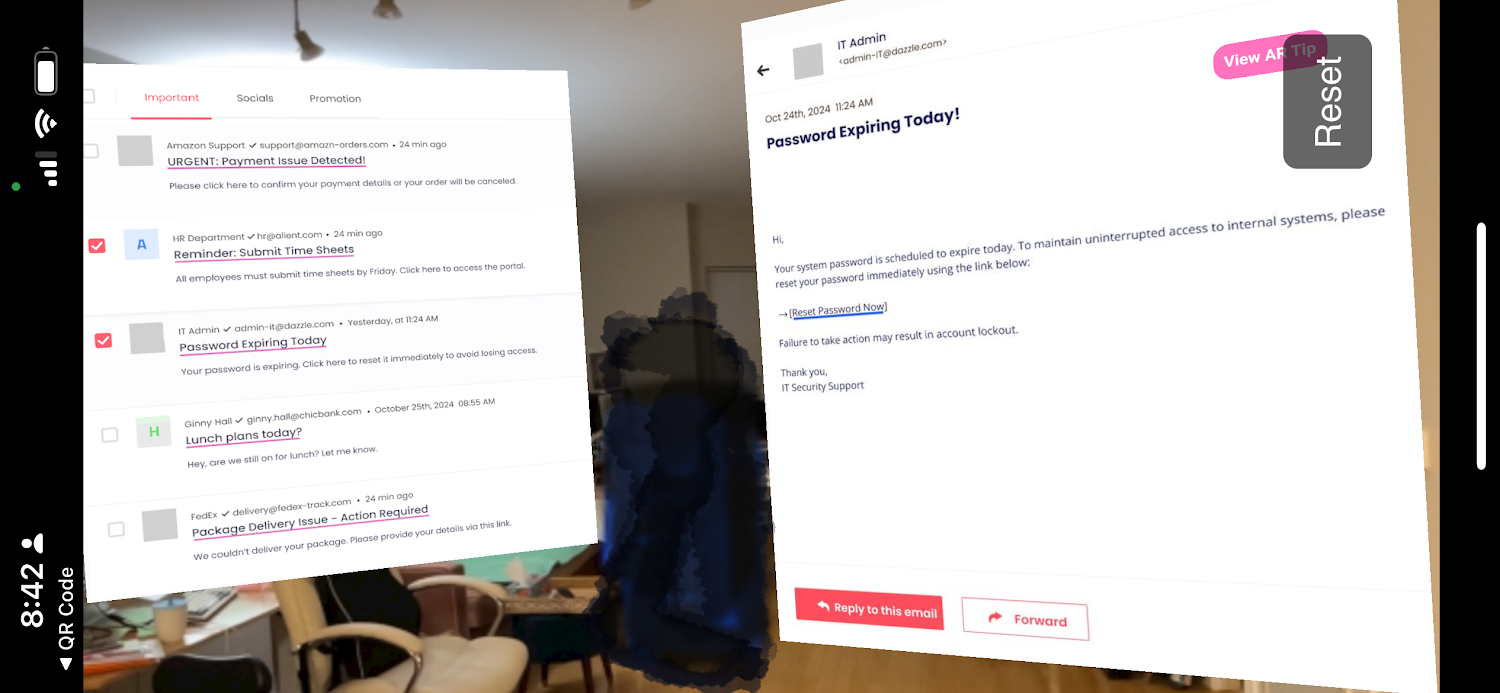
I wanted learners to examine a simulated inbox and interact with individual emails to decide which ones were legitimate or suspicious. Each email had visual cues: dodgy sender domains, urgent tone, suspicious links, etc. Tapping on each subject line would “open” the email, offering an AR overlay with contextual tips about phishing red flags.
🧪 What I Tried
Using Zapworks Designer, I built a multi-scene AR experience:
-
Scene 1: A 2D inbox interface where learners could tap subject lines.
-
Scenes 2–6: Each email displayed as a full-page AR scene with a “View AR Tip” button, revealing an overlay of just-in-time phishing guidance.
-
A final Summary Screen on the Inbox screen/Scene 1 recapped their decisions with key takeaways.
😓 Where It Fell Apart
Despite the instructional intent, the medium (AR) introduced more friction than value. Here’s what I discovered:
-
World-tracked AR made basic UI actions feel clumsy
I spent hours resizing layers, repositioning “floating” buttons, and correcting depth just to make email content legible and tappable on a tabletop. It felt like I was fighting the tool instead of designing with it. -
Zappar’s limitations added complexity
Simple actions like toggling visibility or linking buttons couldn’t be duplicated or reused. Each button had to be created from scratch per scene. Some actions wouldn’t combine, forcing me to simplify interactions. -
AR added novelty, not clarity
The content itself didn’t benefit from being layered into physical space. It wasn’t a 3D object or spatially-relevant experience. It was… email. Flat. Scrollable. Meant to be read closely, not projected across a kitchen table? -
Text size and accessibility became real concerns
AR screens made it difficult to maintain legible text without making email images comically large. On mobile devices, it was too easy to lose detail or accidentally miss a button.
💡 What I Learned
This became a valuable non-example—a reminder that not every learning objective benefits from emerging tech. Sometimes, using AR or XR is like adding neon lights to a sticky note. Flashy, yes. Useful? Not necessarily.
✅ Better Suited for…
The same experience could be more effective as:
-
A responsive Articulate Rise module, with each email as a collapsible section and guided feedback.
-
A Canvas quiz or H5P activity, simulating inbox sorting.
-
A branching scenario, where decisions impact outcomes and phishing threats evolve.
🧭 Why I’m Still Glad I Tried
Designing with XR isn’t just about creating for the medium—it’s about understanding when the medium enhances the message. This project helped me sharpen that discernment. It was messy, yes. But valuable.
I’ll be including this in my XR portfolio under “Lessons Learned” because sometimes, what didn’t work teaches us just as much as what did.
Would I use AR again for cybersecurity training?
Absolutely. But I’d use it to simulate a phishing attack in the real environment—think spatial cues, layered notifications, or guided overlays on a live email client—not to recreate flat UI.
Next stop? Trying out VR onboarding for new device users. Or maybe try a 360VR story with this email phishing topic. With the right problem, XR can shine.