Best AI Video Generators for Instructional Design: How I Use Them as an LXD
September 1, 2025/
Dear readers,
As a learning experience designer, I’m frequently asked what design tools I’m using. “What software should I learn to use, Yin?” or “What’s your AI toolkit?”
Honestly, we live in an era where we’re spoiled for choice, or to put it bluntly, we’re drowning in AI tools. It seems that everyday, something new pops up in my feed. But how many actually help us design better learning?
I’m always testing: avatar makers, 360 video backdrop generators, text-to-video platforms. Prototyping and creating graphics and videos is a large part of a designer’s work. With so many AI video generators for instructional design and workplace learning, how do you know which ones are worth your time? Let me cut through the noise and share what I think about some of them.
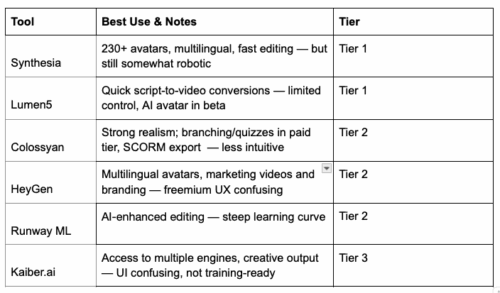
I organized a few video AI tools I’ve explored into three tiers based on a few key questions:
How easy is it to create a “good-enough” video on the first try with a free account? If it works, I may subscribe to test further.
How feature-rich is it?
How much control do I have over the component parts (script, visuals, avatars, animation)?
Does it support interactivity? (This matters for IDs. If an AI tool can handle interactivity, it could offset the need for expensive platforms like Articulate or Captivate.)
I tried these tools, some in greater depth because of access issue: Synthesia, Lumen5, Colossyan, HeyGen, Elai.io, InVideo, Kaiber, and Runway ML.
Note: I tested additional tools, including Kling, Elai.io, InVideo, and Pika Labs. Several were gated behind security or subscription barriers. For example, Kling’s access required a graphic drag-n-drop security check I couldn’t get past. With HeyGen, Elai.io, and InVideo, the free accounts produced videos that didn’t meet my expectations, so I chose not to pursue them further.
For consistency, I used the same short script on AI Fluency across all platforms. To produce the Synthesia sample below, I purchased a Starter subscription. With Colossyan, I didn’t upgrade, so I ran out of credits and couldn’t edit or republish, but what I was able to create with the free account intrigued me enough to want to explore it further.
At this point, I’m leaning toward Synthesia, Lumen5, or Colossyan as my AI video tool of choice.
The following three videos were generated using Synthesia, Colossyan, and Lumen5.
Synthesia-Generated Video (tweaked with a Starter subscription)
Colossyan-Generated Video (free version, no edits beyond initial credits)
Lumen5-Generated Video (auto-generated script, visuals, and voice by the platform).
What is the Tiered Framework About?
The tiers aren’t about who has the “best” AI. They reflect how usable and learning-ready these tools are for an instructional designer.
Tier 1: Tools you can try today with minimal friction. They deliver quick wins for learning teams; most likely for compliance, onboarding, or content repurposing.
Tier 2: Tools with strong potential, but present adoption hurdles (cost, usability, or feature-gating). Great for experimentation, but not yet everyday staples.
Tier 3: Creative sandboxes. Fun for artistic exploration, but not practical (yet) for scalable training without heavy lifting or technical skills.
Yin’s Pro Tip:
Don’t start with the shiniest tool. Start with the end in mind. What learning problem do you want to address?
Need to spin up a quick compliance refresher? Tier 1 tools like Synthesia or Lumen5 will get you there fastest.
Want to explore interactivity without paying for a full LMS? Keep an eye on Colossyan as it evolves.
Curious about pushing creative boundaries? Experiment with Runway ML and maybe Kaiber, but don’t expect them to replace your learning stack yet.
The real strategy isn’t picking one tool. It’s building a lightweight “video production line” that matches the pace and budget of your learning needs.
So, Synthesia, Lumen5, Colossyan, or a combination of these, that’s your AI video production line without hiring a full media team in this age of genAI.
As learning designers, our job isn’t to chase every new tool. It’s to evaluate which ones actually reduce friction, scale impact, and keep the focus where it belongs: on the learner.